 By
By 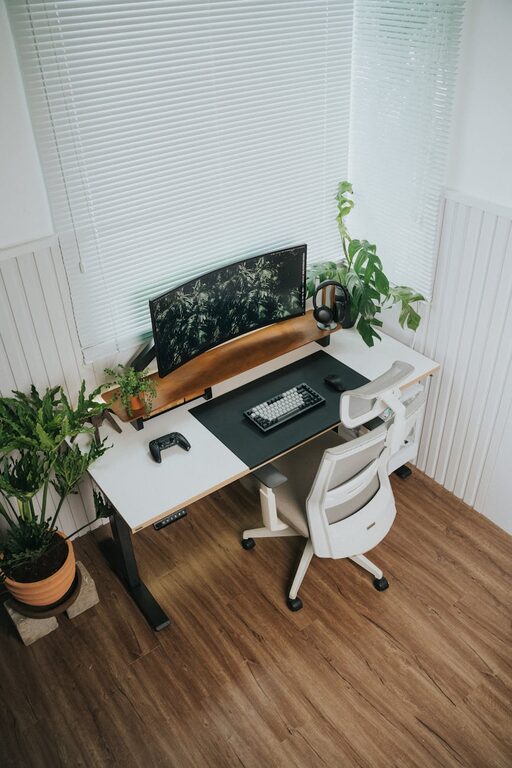
Creating a home office that balances productivity and comfort is essential for anyone working remotely or spending significant time at home. Whether you are new to remote work or want to improve your current workspace, these tips will help you design an environment that supports focus, creativity, and wellbeing.
1. Choose the Right Location
Finding the ideal spot for your home office is the first step to creating a productive space.
– Quiet and Private: Aim to set up your office in a quiet corner or a spare room where distractions are minimal.
– Natural Light: Position your desk near a window if possible. Natural light improves mood and reduces eye strain.
– Away from High Traffic Areas: Avoid placing your workspace near busy family zones or TV rooms to limit interruptions.
2. Invest in Ergonomic Furniture
Comfort plays a major role in productivity, so selecting ergonomic furniture is worth the investment.
– Quality Desk and Chair: A height-adjustable office chair with lumbar support and a desk at the right height help prevent posture problems.
– Footrests and Monitor Stands: These accessories can further enhance comfort and promote good ergonomics.
– Keep Essentials Within Reach: Organize your desk so frequently used items are easy to access.
3. Optimize Lighting
Proper lighting reduces eye fatigue and creates an inviting atmosphere.
– Layer Different Types: Combine ambient lighting with task lighting such as a desk lamp for focused work.
– Avoid Glare: Position screens to reduce glare from windows or overhead lights.
– Use Soft, Neutral Bulbs: Warm white bulbs are gentle and help maintain alertness without harshness.
4. Minimise Clutter and Organize
A tidy workspace helps the mind stay clear and focused.
– Declutter Regularly: Keep only essential items on your desk.
– Use Storage Solutions: Drawers, shelves, and desk organisers keep documents and supplies orderly.
– Manage Cables: Cable ties or under-desk trays reduce tangled cords, making your setup neat.
5. Personalize Your Space
Adding personal touches can make your home office enjoyable and motivating.
– Add Plants: Indoor plants improve air quality and add a calming green element.
– Decorate Thoughtfully: Use artwork, photos, or inspiring quotes to create a positive mood.
– Choose Comfortable Textiles: A cozy rug or cushions can enhance comfort during long working hours.
6. Set Boundaries and Schedule Breaks
Creating a productive environment is also about managing your workflow and mindset.
– Define Work Hours: Set clear start and end times to separate work from personal life.
– Communicate Boundaries: Let family or housemates know your work schedule to reduce interruptions.
– Take Regular Breaks: Short breaks every hour refresh your focus and prevent burnout.
7. Ensure Reliable Technology
A smooth work experience depends on trustworthy equipment and connectivity.
– Strong Internet Connection: Use a wired connection or ensure strong Wi-Fi signal at your workspace.
– Essential Devices: Invest in a good computer, headphones for calls, and backup power solutions.
– Keep Software Updated: Regularly update tools and apps to avoid technical disruptions.
8. Control Noise Levels
Too much noise can be distracting, but some background sounds may help concentration.
– Use Noise-Cancelling Headphones: These help block out unwanted sounds.
– Add Soft Furnishings: Curtains, carpets, and cushions absorb sound and reduce echo.
– Consider White Noise or Music: Some people find subtle background sounds improve focus.
—
By carefully selecting your workspace, investing in ergonomic furniture, controlling lighting and noise, and organising efficiently, you can build a home office that supports both productivity and comfort. Remember that your work environment influences your energy and mood, so take time to personalize it to suit your needs. With a well-designed setup and healthy routines, working from home can become both enjoyable and effective.